Not long ago, the typical customer journey was straightforward: search for a product, browse product detail pages, compare options, and make a purchase.
Today, shoppers can ask questions in natural language, compare products, receive personalized recommendations, and use AI-powered tools to narrow down their choices. And this shift is changing what optimization means for brands.
An Amazon Brand Store is no longer simply a branded destination where shoppers browse a catalog. It can serve as a centralized shopping experience that helps customers understand a brand, explore products, compare solutions, and discover products based on their needs.
For brands investing in Amazon Brand Store optimization, the opportunity goes beyond better design. The goal is to create a clear and connected educational experience that supports discovery, engagement, conversion, and AI-assisted shopping.
Why Amazon Brand Stores Matter
Brand Stores give brands a location to create a dedicated shopping destination within Amazon. Rather than relying on individual product detail pages, brands can organize their products in a way that showcases them and tells a more complete story.
This creates several advantages, including:
- Higher engagement: Brand Stores give shoppers more opportunities to explore products and categories.
- Larger basket sizes: When complementary products are presented together, shoppers can discover additional products they may not have considered.
- Better cross-selling: Brands can create collections, routines, and product groupings that connect related products.
- Customer education: Stores provide space to explain differences between products, highlight use cases, and help shoppers determine which solution is right for them.
This broader experience matters because customers do not always arrive on Amazon knowing exactly what they want. For example, someone searching for a haircare product may know they have dry hair, but not know whether they need a shampoo, treatment, mask, or styling product.
A well-organized Store can guide that shopper through the options, becoming a decision-making tool.
Shoppers are no longer browsing their way to that answer. They are asking for it.
Why AI-Powered Discovery Should Change Your Brand Strategy
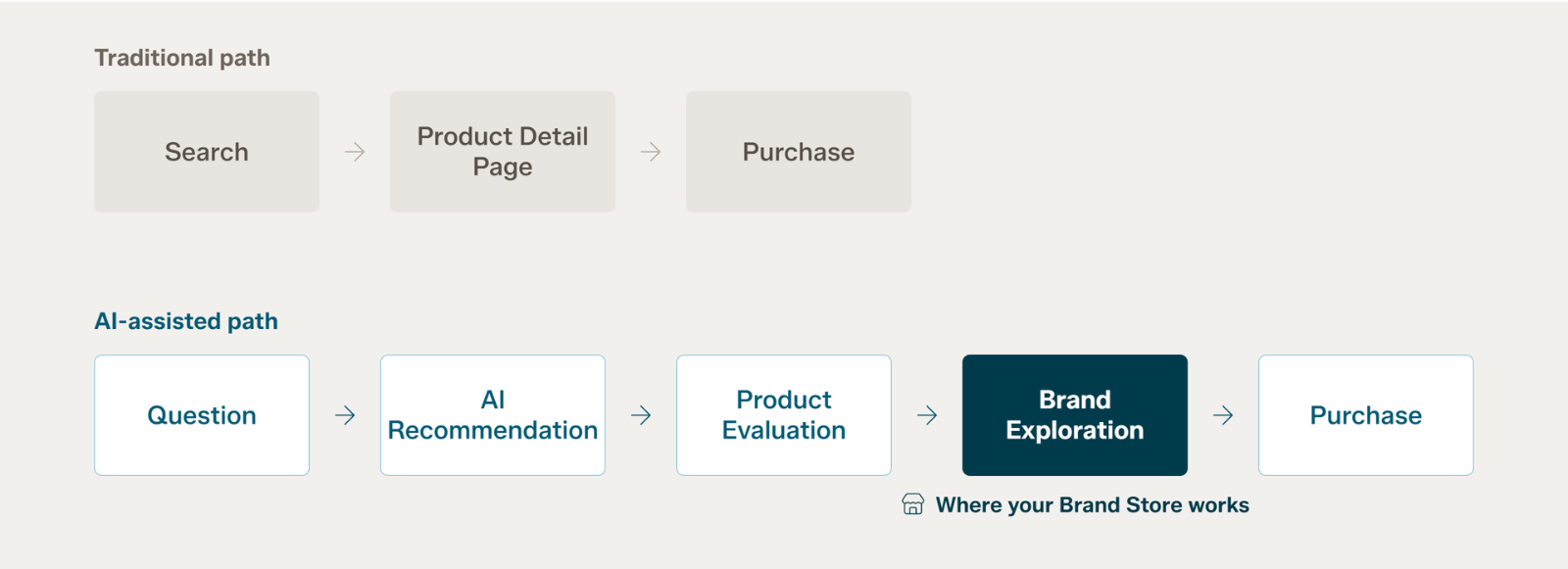
The traditional Amazon shopping journey might look like this:
Search → Product Detail Page → Purchase
While the emerging journey can often look more like this:
Question → AI Recommendation → Product Evaluation → Brand Exploration → Purchase
Amazon has introduced Alexa for Shopping (formerly known as Rufus). This is not a chat window tucked off to the side, but rather integrated as the assistant sits in the main Amazon search bar, generates AI summaries above search results and on product detail pages, and runs side-by-side product comparisons within the results page itself. It is available by default to every signed-in U.S. shopper, with no Prime membership or Echo device required. Amazon is betting that shoppers will describe what they need rather than guess at the right keyword.
Shoppers can ask Amazon conversational questions such as:
- What should I use for dry, damaged hair?
- Which products are best for a beginner?
- What do I need for a complete skincare routine?
- Which option is best for travel?
- What products work well together?
Amazon's AI-powered shopping experiences are designed to help customers navigate questions that are important to them, compare products, and receive recommendations based on shopping intent.
For brands, that means product information needs to communicate more than what a product simply is. It needs to communicate why, when, and for whom the product is relevant.
That is where Amazon Store optimization becomes increasingly strategic.
What Makes an Amazon Brand Store AI-Ready?
AI readiness should not be viewed as a matter of simply adding more keywords or content – the days of keyword stuffing are long gone. Instead, it is a question of whether your product logic is legible.
Your Brand Store is where you decide how your catalog makes sense: which products solve which problems, how they differ, and which belong together. That decision does not stay in the Store. The same structure shows up in your titles, bullets, A+ content, and backend attributes, which are the surfaces Amazon’s assistant reads when deciding whether to recommend you. A brand that cannot articulate its own product logic in a Store will not articulate it anywhere the AI is looking.
Store modules are heavily visual, so if your comparison chart, use-case guidance, or point of differentiation lives only inside an image, it is invisible to anything but a human eye. Put the claim in text as well as in the graphic.
A strong Store clearly communicates:
- What the brand offers
- Who each product is for
- Which problems each product solves
- How products differ
- Which products work together
- When shoppers should use each product
Create Clear Category Organization
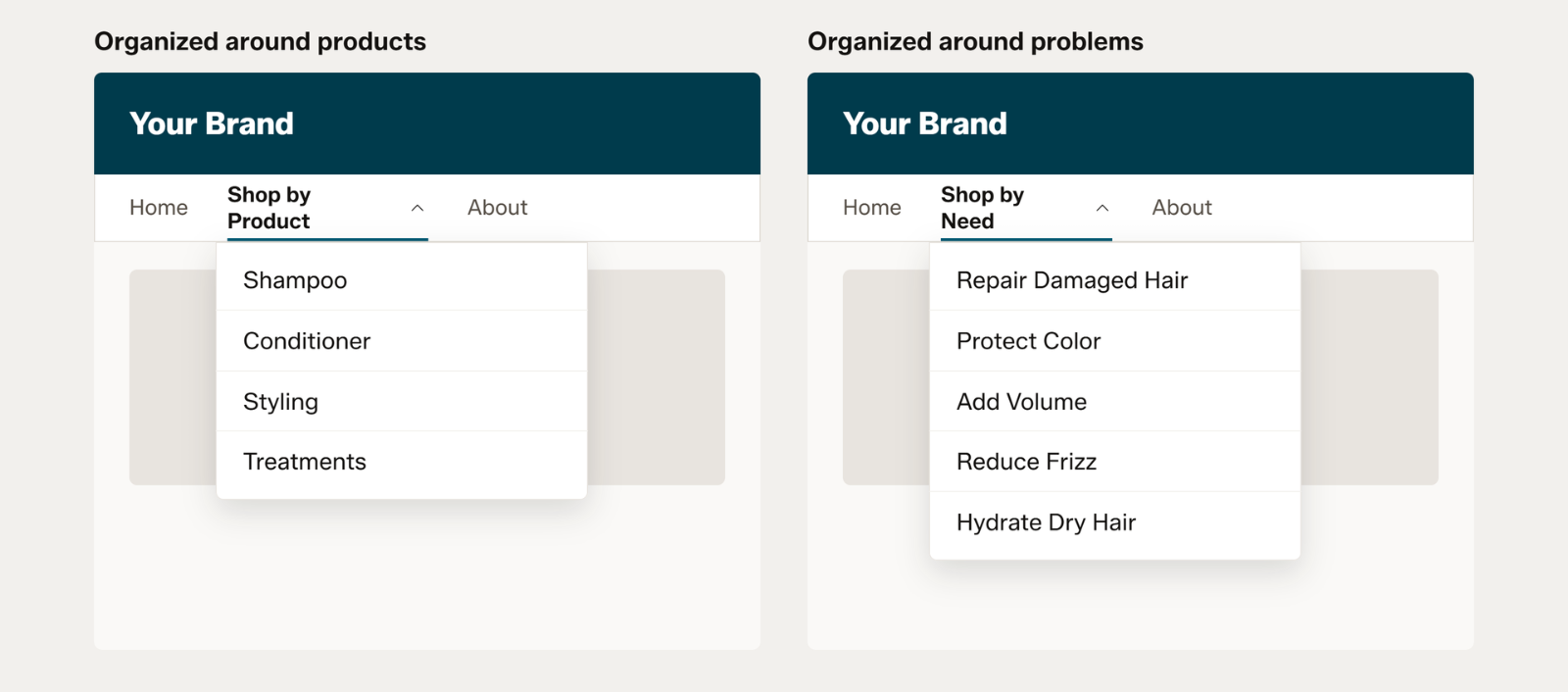
Products should be organized around the way customers shop with clear category organization. The goal is to connect products with the needs customers are likely to use when shopping.
Traditional navigation may organize products by category, such as: Shampoo | Conditioner | Styling | Treatments. But brands can also create additional discovery paths based on customer needs, benefits, or use cases.
For example, a haircare Brand Store might maintain its core product categories while also helping shoppers explore what they need the product for, such as: Repair Damaged Hair | Protect Color | Add Volume | Reduce Frizz | Hydrate Dry Hair.
The difference is simple: navigation provides the structure of the Store, while discovery paths give shoppers multiple ways to find the right products within that structure. By connecting categories with customer needs and shopping intent, brands can make it easier for shoppers to discover relevant products—even when they don't know exactly what they are looking for.
Build Connected Product Collections
Your Store should not feel like a collection of unrelated SKUs but build relevant product collections. This helps shoppers understand how individual products fit into a broader portfolio. It also creates more opportunities for cross-selling and deeper brand exploration.
Create meaningful product relationships through collections such as:
- New Arrivals
- Bestsellers
- Complete the Routine
- Dry Hair Solutions
- Color Care
- Styling Essentials
- Travel Favorites
- Seasonal Must-Haves
Merchandise Around Use Cases
One of the biggest opportunities in Amazon Brand Store optimization is moving beyond product-centric merchandising and focusing on use cases that customers are looking for.
Instead of asking: "What products do we sell?"
Ask: "What shopper problems do we solve?"
For example, a protein brand could create collections around:
- Morning Recovery
- Pre-Workout
- Post-Workout
- On-the-Go Nutrition
- Starter Essentials
A skincare brand could organize products around:
- Hydration
- Brightening
- Sensitive Skin
- Morning Routine
- Nighttime Routine
This approach gives customers multiple ways to enter the product catalog and helps establish meaningful connections between products.
Amazon Brand Store Best Practices for Discovery and Conversion
Effective Amazon Brand Store best practices go beyond visual design.
Design Around Customer Problems
Start with customer needs rather than internal brand categories. Ask what shoppers are trying to accomplish and build navigation around those goals.
A good Store experience should quickly answer: "Where should I go if I have this problem?"
Lead With Your Strongest Products
Your homepage should immediately communicate what the brand offers and where shoppers should go next. Lead with products and collections that are most important to the brand, such as bestsellers, hero products, new launches, or high-priority categories. This gives shoppers a clear starting point and creates an intuitive path from brand discovery to product exploration.
Do not make shoppers navigate through multiple layers to find your most important products.
Use Educational Content
Brand Stores provide an opportunity to answer questions that may be difficult to address through product imagery alone.
Use educational content to explain:
- Which product is right for me?
- What is the difference between these products?
- What problem does each product solve?
- When should I use it?
- Which products work together?
- Where should I start?
This is particularly valuable in categories where shoppers may need additional information before making a purchase.
Create Comparison and Cross-Sell Pathways
Comparison content, product collections, routines, and complementary product recommendations can turn a Store into a guided shopping experience rather than a catalog. If products have similar purposes, help shoppers understand their differences.
For example, instead of simply displaying five styling products, a brand could help customers choose based on desired results such as volume, texture, hold, smoothing, or shine.
Keep Navigation Simple
Adding more pages and collections does not necessarily create a better shopping experience.
Keep important destinations easy to find and minimize unnecessary navigation sections. Shoppers should be able to move from a need or category to relevant products with as few barriers as possible. This is an argument against sprawl, not against depth. Amazon reports that Stores with three or more pages see meaningfully higher dwell time and sales per visitor, so treat three pages as a floor and your capacity to keep them current as the ceiling.
Optimize for Mobile
A Store that works well on desktop but is difficult to navigate on mobile can create friction.
Review how navigation, images, text, video, and product collections appear across devices. Keep messaging concise and make the most important information easy to understand.
Use Video Strategically
Video can demonstrate products in use, explain product differences, communicate benefits, and bring branding to life. However, videos should have a purpose.
Rather than adding video simply because it is available, consider where it can answer a question or help a shopper make a decision.
Use the Same Language Across Every Surface
If a Store collection is called Repair Damaged Hair, that phrasing should also appear in the titles, bullets, and A+ content of the products inside it. Consistent language reinforces the association across every surface a shopper or an algorithm might encounter, and it means someone arriving from an AI recommendation finds the same vocabulary waiting for them. Inconsistent naming forces both the shopper and the system to do translation work.
Build Navigation From Real Shopper Questions
The questions customers actually ask are the best available source for navigation labels. Review your Q&A section, your reviews, your search term reports, and the questions your customer service team fields most often. Then name Store sections after those questions rather than after your internal category structure.
Refresh the Store Regularly
Your Store should evolve alongside your brand. As products launch, seasons change, and customer needs shift, regular updates keep the experience relevant and give shoppers new reasons to return. Amazon has reported that Stores updated within the previous 90 days average roughly 21% more repeat visitors and 35% higher attributed sales per visitor. Amazon’s AI-powered tools for creating and updating Store content further reinforce that optimization is becoming more dynamic. Treat your Store as an ongoing commerce experience, not a one-time project.
Common Amazon Brand Store Mistakes
Even established brands can underuse their Stores.
Common mistakes include:
- Treating the Store as a product catalog
- Creating too many navigation levels
- Using generic homepage messaging
- Failing to organize products around customer needs
- Providing little product education
- Using weak or repetitive imagery
- Missing opportunities for video
- Failing to create cross-sell pathways
- Ignoring seasonal shopping behavior
- Not updating the Store after product launches
- Sending advertising traffic to irrelevant Store pages
- Creating disconnected experiences between ads, Store pages, and product detail pages
- Locking comparison charts, use cases, and product differences inside images with no text equivalent
The biggest mistake may be thinking about the Store as an endpoint. Instead, it should be viewed as part of the entire customer journey.
Measure Success Beyond Store Visits
Store traffic is important, but it should not be the only measurement of success. Brands should evaluate whether their Store is helping shoppers move through the purchase journey.
Important metrics can include the following, though they are not all in one place. Some come from Stores insights, others from advertising reports or Amazon Marketing Cloud:
- Views per visitor
- Sales per visitor
- Add-to-cart behavior at the ASIN level
- New-to-brand performance (from advertising reports, not Stores insights)
- Sales per order (average order value)
- Halo sales and units
- Repeat visits
- Traffic by source
- Sponsored Brands destination performance
- Amazon Marketing Cloud path analysis
Looking at these metrics together can reveal whether a Store is simply attracting traffic or helping customers discover, evaluate, and purchase products. For example, strong traffic combined with low sales per visitor may indicate that the Store is attracting shoppers but failing to provide enough direction. Likewise, strong engagement and cross-product purchasing can indicate that collections and product relationships are helping customers explore the broader portfolio.
It is also worth watching the signals that point specifically to AI-influenced discovery, including branded search volume, new-to-brand rate on Sponsored Brands campaigns that route to the Store, and Amazon Marketing Cloud path analysis showing which touchpoints precede a Store visit. None of these measures AI attribution directly, because Amazon does not report it. Read together, they indicate whether shoppers are arriving already informed rather than beginning their research on your Store.
The Future of Amazon Brand Stores
The future of the Amazon Brand Store is closely tied to AI-powered shopping. As Amazon makes it easier for customers to ask questions, compare products, and receive recommendations, brands need clear, connected product information across detail pages, Store content, advertising, and other touchpoints.
The strategic takeaway is simple: brands need to optimize not just where shoppers click, but how clearly their products can be understood.
Brand Stores can bring together product education, use cases, complementary products, and customer needs in one organized place. Over time, they may evolve from traditional digital storefronts into brand knowledge hubs within Amazon, making organization and context more important than ever. Amazon’s assistant already personalizes recommendations using each shopper’s purchase history, which points toward Store experiences that adapt to the visitor rather than serving everyone the same homepage. Dynamic merchandising of that kind would make a clear, well-structured product taxonomy more valuable, not less.
Build a Store That Helps Shoppers—and AI—Understand Your Brand
Amazon Brand Stores are no longer simply digital shelves, but they are strategic destinations that can support awareness, discovery, education, consideration, conversion, cross-selling, and loyalty. As AI changes the way customers discover and evaluate products, brands that clearly communicate their products, use cases, benefits, and relationships will be better positioned to create meaningful shopping experiences.
That is why Amazon Brand Store optimization should be treated as an ongoing commerce strategy, not a one-time design project.
The strongest Stores do more than showcase products. They answer questions, simplify choices, connect related products, educate shoppers, and make it easier to understand why a particular product is the right solution. In an increasingly AI-assisted Amazon marketplace, the brands that are easiest to understand may also be the brands that are easiest to discover, recommend, and buy.
Looking to optimize your brand's presence on Amazon? Blue Wheel can support your success with marketplace ecommerce strategy solutions. Reach out to our team today to connect with us!
Kristin Boyd
Kristin Boyd is a marketplace copywriter with over 7 years of e-commerce experience, specializing in product content, SEO, and conversion-focused copy. She has developed and optimized titles, bullet points, descriptions, A+ Content, and backend keywords for a wide range of brands on Amazon and other marketplaces. Combining creativity with SEO expertise, AI optimization, and marketplace best practices, Kristin helps brands create content that balances search visibility, brand voice, and the customer experience.