
When deciding on a price point for your products, it’s important to not only factor in your costs and profit margin goals, but to also consider how your competitors are pricing similar products.
If a customer can purchase an equivalent product to yours at a considerably lower price, you'll likely see an impact on sales. With the new Similar Pricing Dashboard on Amazon, sellers can now gain competitive pricing insights into similar products, at no cost!
What is the Amazon Similar Pricing Dashboard?
The Similar Pricing Dashboard provides insight into your competitor’s pricing – get up to 5 similar product pricing insights per SKU.
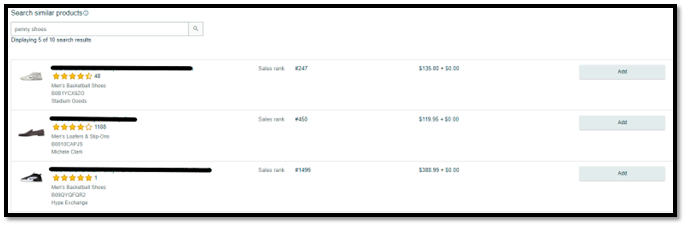
Amazon Sellers can use the Similar Pricing Dashboard to get a better idea of how their competitors are pricing comparable products.
How to Use the Similar Pricing Dashboard in Seller Central
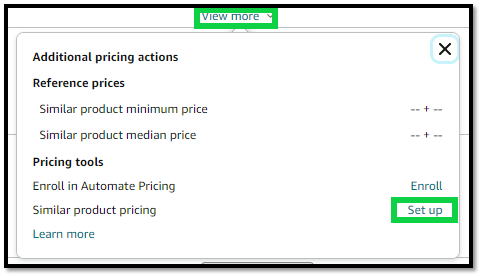
To view similar product pricing recommendations, go to the Manage Inventory page in Seller Central and click “view more” next to the product you want to get insight into. Next to “Similar product pricing” click “Set up”.
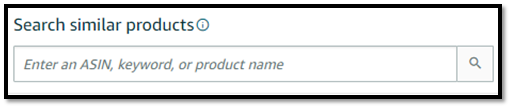
From there, search for similar products by ASIN, keyword, or product name. Add up to 5 similar products for comparison per child ASIN.
If you're a client looking for more information, please contact your account team. If you’re interested in learning more about how Blue Wheel can aid in your brand efforts in online marketplaces, schedule a consultation with our team, we would love to hear from you!
Julia Asburry
Julia Asburry is the Senior Marketplace Support Analyst at Blue Wheel, where she plays a vital role in enhancing Account Health and Customer Service management. Her work empowers our clients to not just sustain, but truly thrive in the eCommerce landscape. With over half a decade of diverse experience in the industry, she wears many hats within the organization, bringing a wealth of expertise that propels us forward and helps set us apart.